

FILMORA: Video editing tool
Video editing is an important skill for many people. As a student, business owner, content creator, online coach, freelancer or social media manager, knowing how to edit videos can help you communicate better and reach more people.
One of the tools that makes video editing easier is Filmora.
Filmora is a video editing software created by Wondershare. It has many useful tools and its interface is simple enough to understand. It is widely used by YouTubers, content creators, students and small businesses.
With Filmora, you can create and edit videos for Youtube, tiktok, online courses, business adverts, presentations, tutorials, reaction videos and many other purposes.
The good thing about filmora is that you do not need to be an expert before you can begin.
YOU CAN ALSO READ
Writing and Content Creation AI; 100 AI Platforms Volume 2
100 AI Platforms, Apps and Websites You Must Know
THE SECRETS OF FINANCIAL DISCIPLINE
What is filmora used for?
Filmora is used for creating, editing, improving and exporting videos. It helps you arrange video clips, add music, include text, use transitions, apply effects, remove unwanted parts and make your video more interesting to watch.
Filmora can be used to edit a video you recorded on your phone. You can cut out mistakes, add background music, include your business logo, add captions, and export the final video for social media.
It is also great for more creative projects. If you want to make a birthday video, wedding highlight, school project, product review or online lesson, Filmora gives you the best tools to do that.
Important features that make Filmora stand out.
1. It is beginner friendly.
One of the main reasons people like Filmora is that it is easy to understand. This is because the workspace is well organized and arranged in a simple way. For someone who is new to video editing, this can save a lot of time and reduce stress.
2. Auto video generation.
This feature is very useful for people who want to create videos but feel shy, nervous or unsure of how to start.
Some people do not like to show their faces on camera. Filmora’s auto video generation can help such people. With this feature, users can create videos using images, short clips, text, voiceovers, stock media or AI assisted tools.
That means you don’t always have to appear on camera to create engaging content.
3. Picture-in-picture feature.
One of the strongest features Filmora offers for content creation is the picture-in-picture feature, often called the PIP feature.
PIP allows you to place one video on top of another. This is very useful for reaction videos, tutorials, commentary videos, online lessons and product reviews.
Having talked about the use of Filmora and what helps it stand out, lets move on to how to download and install Filmora. Once Filmora is installed in your device, you will be ready to explore its features and begin editing.
How To Download And Install Filmora.
The preliminary step is to ensure that your device is connected to the internet. This is necessary because Filmora has to be downloaded online from the app or play store, and you also need internet access to sign in or use some of its online features.
Step 1: Open the google play store if you’re using Android or go to apple store if you are using an apple phone. The image below shows your google play store.
Step 2: When the play store opens, you will see a search bar at the bottom of the screen as indicated below.
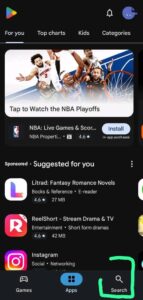
Tap on the search bar and type Filmora. After typing the name, tap the search button on your keyboard.
The play store will show you different results related to filmora.
Step 3: Select the CORRECT Filmora app: The app is usually listed as Filmora: AI video editor and maker.
Make sure you select the correct app developed by Wondershare Filmora or Wondershare Technology so that you do not mistakenly download the wrong application.
Step 4: Tap on install
You will see the install button beside the name of the app. Tap on install and wait for the app to download and install in your device.
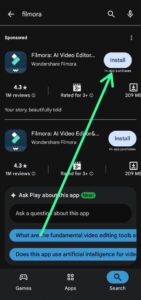
Note that you don’t need to do anything during this stage. Just wait until the installation process is complete.
Once the installation is successful, the install button will change to Open.
After successful download and installation, click on open and open the Filmora app on your phone. The next thing is to log in with email address and password.
Step 5: To sign in with email address and password, check the bottom right corner of the page, you will see an image icon. Click on the image.
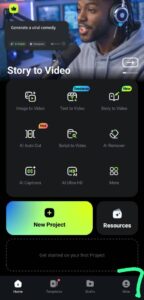
When you do so, it will take you to the next page as shown below. Click on Login.
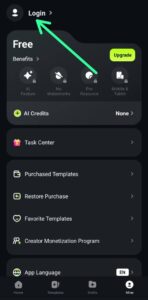
Next, click on log in with Email.

Click on log in with account password.
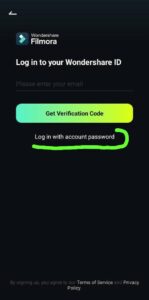
Enter your email address correctly then type your password. After that, tap on Log In.
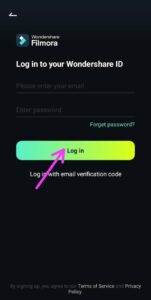
Make sure your email and password are correct before submitting. If there is any mistake, the app may not allow you to login.
After downloading and installing Filmora, your device is now ready for video editing.
In the next lesson, you can begin to learn how to import videos, cut clips, add music, insert text, use effects, and export your final video.
Conclusion.
Filmora is a simple and powerful video editing tool for both beginners and professionals alike. Its major features include templates, text tool, music, transitions, effects, auto video generation, screen recording and Picture-in-Picture.
These features make video creation easier and faster.
To start, connect your device to the internet, open the app or play store, search and download the official Filmora app and sign in. Then you can begin editing.
Next Lesson: Learn How to Edit Videos with Filmora
Want to learn how to edit videos with Filmora?
In the next lesson, you will learn how to edit with Filmora step by step.
👉 Click here to watch the full tutorial:
Leave a Reply