
How to Sell Both Online and Offline with Selar even without Having A Business
Today, many online platforms have made things easy. Presently, you do not need to have a large company or a physical shop to sell anything, both online and offline. So in today’s lecture, we will focus on how to sell both online and offline with Selar, even without a business or a physical office.
Many people believe they must have a shop, a warehouse or a big office before they earn. What you need presently is a phone, knowledge, the internet, and a platform.
Many online platforms today help digital marketers to sell their products. They grant big opportunities for those who want to sell their products online. Here, Selar is one of them.
Selar, as an online platform, is where one can sell. At Selar, many people promote and sell products and services, books, ebooks, courses, consultations, lectures, and subscriptions.
Here, at Selar, Many people sell tickets, others sell people’s products, while some promote other products through their affiliate programs and thank me. At Selar, you can use their link to request donations too.
Selar makes it easy for anyone to begin a business, even when you do not have a registered business. Selar, as a platform, has made things so easy for everyone, especially digital marketers, ebook owners, individuals, online teachers, coaches, authors, cloth vendors, etc., to make money online.
All you have to do is learn even if it’s one thing, then teach it and use it to make money. So, in this lecture, we will take you through how to create a seller account and then how you can make money with it.
You Can Read
Full Lecture on How to make Money with Selar
Grok AI: A Simple Guide for Everyday Use
How to Get Your First 1,000 Visitors to a Blog
How to Prepare Your Blog for AdSense Monetization
Canva as a Video Editing Tool: Step-by-Step Guide Part 1
Before You Start, Do These
Before you start selling both online and offline with Selar, even without having a business, you have to understand some basic knowledge about Selar. This is an online platform built for people who want to improve their lives, but they do not know how or where to begin. Selar is for those people who want to turn their skills, products, knowledge and visibility into income.
Through the platform, you can sell either your products or those of others. Selar will help you to sell both physical and digital products, affiliate products, video and audio lessons, templates, designs and services. Even when you do not have a business or products to sell, you can sell other people’s products.
You can offer services. Then, you can also request more donations from the people. You can also promote people’s products and earn a commission or a certain percentage from every sale you make.
Promote Other Services and Products Through Selar
You can also discuss with a friend if you want to promote their services through Selar. Before you start, you have to agree on the commission you will receive for each successful sale. For example, Mrs Faith is selling football materials. You can decide to promote Mrs Faith’s products and get a commission from her if you sell and deliver the order. Also, you can receive a donation or organise a class and use Selar to receive payment from your students. So, what is needed in Selar is simply what you can offer. The offer would help people or anybody out there. You can offer such to him or her.
How To Create an Account with Selar
Go to your browser. Go to the address bar and type www.selar.com. When Selar opens, look to the right, you will see “Log In” or “Start Selling”. The “Log In” are for those who have already created their account, while “Start Selling” is for those who are new to the platform.
So, as a newbie, click “Start Selling”, then another tab will open. On the left, you will see the form to create your account. Will you see “Create Your Selar Account” or Already have an account? Log in, scroll down and fill in the forms. Put your first name, last name, email address and password.
Also, make sure your password is at least eight characters. It must also contain a number and a letter. Then wait for Selar to mark it “success”. Mark the small box to agree to the terms and conditions. Click “create account” or create an account with Google or X account.
Choosing What You Plan To Do
To Sell Both Online and Offline with Selar, you have to follow the instructions step by step. When you put in your details, Selar will ask you “what you plan to use Selar to do” They will ask “How do you plan to use Selar today?” Selar will give you three options. You have to choose from these: are you a creator, an affiliate marketer or a customer? You have to make your choice.
If you are coming to Selar to buy products to sell, you can choose “Customer”.
Then, If you want to promote other people’s products, you can choose “affiliate products”.
If you want to sell or receive money, you can choose ” I want to be a creator” .
So, next tick “I am a creator,I want to sell”. Then, on the next page, fill in your gender, date of birth, phone number and where you heard about Selar.
Next Step: Where to Receive Your Money
To use Selar to sell both online and offline, even without having a business, you have to define where to receive your money. Are you on the platform to receive donations, to sell a product or both? Choose one. Then, follow the instructions.
So, immediately, you fill in your gender, date of birth, and how you heard about Selar, and then you can receive the money. They will give you two options for you to choose from. You will options like below:
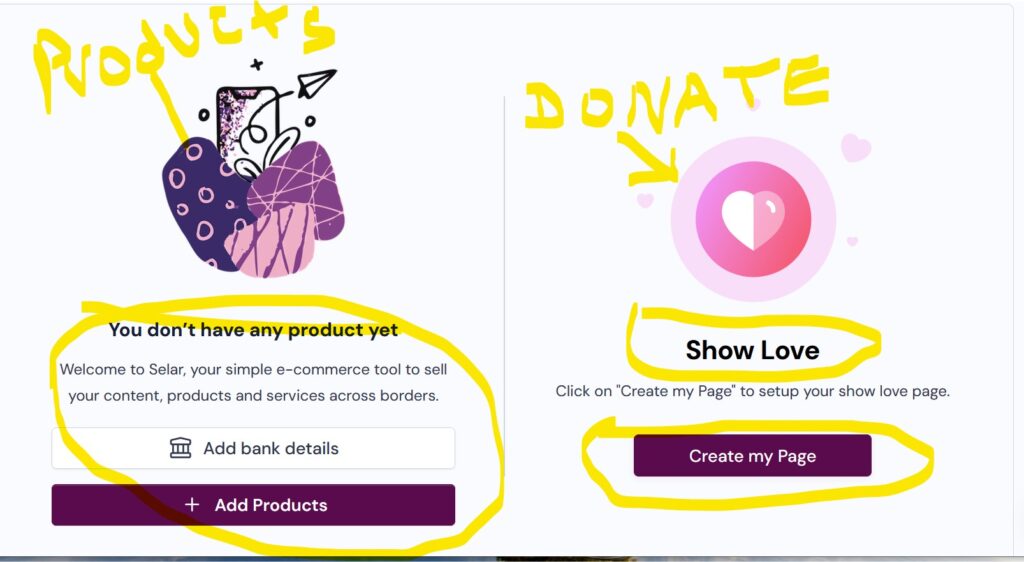
If you want a donation, choose “show me, Love”. Then, if you want to sell, choose “add products”. Choose any. If you want both, you can choose both too.
Choosing “Show Me Love”
“Show Me Love” is a very good option on Selar. “Show me Love” is good. They can use it to sell both online and offline, even without having a business.
This helps those who want to receive donations, tokens, and support. It is also for those who want to say thank you for whatever services they rendered free of charge to people. For example, after teaching a lecture online free of charge, you can drop your selar”show me love link for people to gift you.
Step 1
When you choose “Show Me Love”, click “create my page”. Firstly, they will ask you to set up your bank details. There, put your country, bank and bank details, that is your account number, then click “Verify account detail”, once it is verified. Your name will appear there. Click “continue” They will ask you if you are sure that it is your account details. You click ok and continue.
Step 2
They will save your account details and bring you back to the “Show me love Page”, click “create page” again.
Next, click “add avatar” to add your picture or any picture you want to use to represent the page.
Then, enter the name you want to appear as your “Display Name”.
Write a bio about yourself. Fill the bio in the space. Fill the “showmelove” link with any name that is unique to you. This is where people will click and send you a gift. Then choose your theme colour. Fill the “Show love heading text”. This is what will appear when they see the link. Write a thank you message for those who supported, and then add your social media link and tick the terms and conditions.
Then click “start receiving love”. When you click, they will give you a unique link. Save the link and use it in your content and blogging. People can give you gifts through that link.
Conclusion
Selar is a very good option whenever you want to sell your products. It allows you to sell your products both online and offline, even without having a business. So, in our next lecture, we will discuss how you can use it for other products, how to upload your products and sell or sell other people’s products.
Thank you so much for this father,i want to know how i can use to sell my products
Thank you so much Padre
Thank You Fr for all You do for humanity. May God continue to be with You and more oil in Your Lamp as You work in His Vaneyard through Christ Our Lord Amen 🙏🙏🙏
Thank you so much padre